If you've been following my retrochallenge at all, then you have come to one of two conclusions: Either I'm making progress but not blogging about it, or I'm just no making progress. Unfortunately it was the latter, not the former. My last blog earlier this month discussed all the progress I had made: I developed my tool chain and created a Makefile that automated the build process and would be flexible as the project grew. But this turned out to be pointless since my project never grew.
Why didn't the project go anywhere? Well, there are a lot of reasons. I was unexpectedly busy at work, so I didn't have quite as much free time as I normally would. But more significantly, being so busy at work just left me less motivated to program on my own, since programming is what I do professionally.
Another reason is that, although I had a full LMweek off from work and the family was gone, this turned out to offer me less free time than I had anticipated. My hobby stuff, including all my retro stuff, was crammed into my "man cave" upstairs in the house, but some rearrangements meant that I could take over the office down below, so I spent part of my free week moving my stuff into my new digs. This is a big improvement for me, because it allows me to setup two or three retro systems at one time, whereas before I was really limited to only one or maybe two if the second one didn't take up much space. And I still have my "man cave" which will now become my ham shack (as in ham radio, not pork).
Which leads me into my third reason: Distractions! Early in the month I purchased a 6502 SBC, so I got distracted by that. Then @Retrochallenge started tweeting about his ham radio activities, and that inspired me to get back into that hobby. And even just recently, I purchased a Kaypro 2000. Although this hasn't arrived yet, I started looking into this system as well. So basically I lost focus early on and just never really got back to my project.
This is my second retrochallenge, and so far I'm 0 for 2 in terms of completing my project. But even though I didn't complete last year's either, I felt a lot better about that. My project involved a lot of reading and learning of the PDP-8 and OS/8, which turned out to take a lot more time than I had expected. So even though I didn't finish, I learned a lot and felt like I had accomplished a lot. This time, though, was almost a complete bust. I did relearn a bit of the xBase platform, and the project skeleton I made for kBase will be usable for future cc65 projects, whether they be for the Apple II or for other 6502 platforms. I also got a copy of Tom Raidna's TUI library, which I think will be useful for future projects. So I do feel like I at least gave myself a bit of a step up for future projects, but I definitely didn't really accomplish much. So I feel pretty unsatisfied with my work this month.
So is this the end for kBase? Honestly I don't know. I still like the idea of the project, but I just don't have the motivation to work on it right now. There are just too many other things I'm playing with at the moment. And this is a hobby, not work. But I can't predict what ideas will grab me in the future, and I enjoy working on interpreters, so there's every possibility that I'll come back to this project. Maybe just in time for Retrochallenge 16/07!
Saturday, January 30, 2016

Tuesday, January 12, 2016
RC 2016/01: My development tools, part 2
In my last post, I talked about some of the tools I would use - specifically cc65 and AppleCommander. But at the time of that post, I hadn't actually done any development yet. Now I have, though admittedly I still haven't gotten very much done. I have refined the build process that I used with other cc65 projects so that it's a bit more logical and flexible, and I've incorporated a library from one of my Retrochallenge "competitors"; more on that below. Nevertheless, I still have a lot of work to go and it's already 12 days into January. I knew the first half of the month would be slow going, given everything else I have going on, but I've made even less progress than I'd expected. I'm hoping I can catch up during the second half of this month.
If you're interested in taking a look, check out the repository on Github: https://github.com/hculpan/kbase. Note that if you build and run it, it's actually a slightly modified version of the A2 CARDIAC program (see my Prepping for the Challenge post for more information on this). Obviously this will change, but I just wanted some code to test out my build process.
In this post, I'll talk about my build tool, editor, and emulators that I am using.
Of course, with Linux you almost certainly already have Make installed, and on Mac OS X, it gets installed when you install Apple's command line development tools (see cc65 above). With Windows, though, it's a bit more of an issue. My solution is Cygwin, which is one of the first things I install on any Windows machine anyway. If you don't want to install Cygwin, there is MinGW. Otherwise, I'm not really sure how to get Make on Windows, but that's just because I don't generally do C/C++ on Windows, and when I do I happily use the Cygwin tools. There are also other newer cross-platform build tools, but since I'm happy with Make, I haven't really investigated alternatives.
 For code editing, I use the relatively new Atom editor. Overall I like the editor, but honestly it's two best features for me are that it's cross-platform and that it can be launched from the command line. This last is a rare feature among editors, and for a command line guy like me, a welcome one. I can type "atom ." at the command line (and I always have a command prompt open), and it will open with all the files in the current directory listed in the left panel, ready for me to select. It's almost like having a project manager built into the tool without having all the constraints of a full-blown IDE. Otherwise, I just use it as a text editor. I haven't installed any plugins to launch builds from my editor or anything else. It does have C and Makefile syntax highlighting built in, which is nice.
One way I think I'm different than many other developers is that I'm actually pretty neutral about my editor. I can use anything from Vi to a full IDE without too much complaint, as long as it's not Emacs. During my last Retrochallenge, I even began to like TECO, the PDP-8 editor, so really I'm pretty flexible when it comes to my editor. As a side note, it is a little ironic that I hate Emacs but like TECO, since Emacs actually started as a set of macros for TECO.

If you're interested in taking a look, check out the repository on Github: https://github.com/hculpan/kbase. Note that if you build and run it, it's actually a slightly modified version of the A2 CARDIAC program (see my Prepping for the Challenge post for more information on this). Obviously this will change, but I just wanted some code to test out my build process.
In this post, I'll talk about my build tool, editor, and emulators that I am using.
Make
For my build tool, I went with the Make utility. There are almost certainly better tools out there for C development, but honestly I'm reasonably familiar with Make so it's just easy for me to use. I also like that it makes no assumptions and I'm in complete control of what build targets are available, what commands get executed, etc. In my professional life as a Java developer, I use Maven, which really does most of the work for you. I'm happy with that build tool, but it can be a pain when you want it to do something that it doesn't want to do. But with Make there are no such issues; it does only what I tell it to do and nothing more. For a larger project, like those I work on in my job, this could be bad and hard to manager, but for a small project like kBase, this is much easier.Of course, with Linux you almost certainly already have Make installed, and on Mac OS X, it gets installed when you install Apple's command line development tools (see cc65 above). With Windows, though, it's a bit more of an issue. My solution is Cygwin, which is one of the first things I install on any Windows machine anyway. If you don't want to install Cygwin, there is MinGW. Otherwise, I'm not really sure how to get Make on Windows, but that's just because I don't generally do C/C++ on Windows, and when I do I happily use the Cygwin tools. There are also other newer cross-platform build tools, but since I'm happy with Make, I haven't really investigated alternatives.
Atom editor
 For code editing, I use the relatively new Atom editor. Overall I like the editor, but honestly it's two best features for me are that it's cross-platform and that it can be launched from the command line. This last is a rare feature among editors, and for a command line guy like me, a welcome one. I can type "atom ." at the command line (and I always have a command prompt open), and it will open with all the files in the current directory listed in the left panel, ready for me to select. It's almost like having a project manager built into the tool without having all the constraints of a full-blown IDE. Otherwise, I just use it as a text editor. I haven't installed any plugins to launch builds from my editor or anything else. It does have C and Makefile syntax highlighting built in, which is nice.
One way I think I'm different than many other developers is that I'm actually pretty neutral about my editor. I can use anything from Vi to a full IDE without too much complaint, as long as it's not Emacs. During my last Retrochallenge, I even began to like TECO, the PDP-8 editor, so really I'm pretty flexible when it comes to my editor. As a side note, it is a little ironic that I hate Emacs but like TECO, since Emacs actually started as a set of macros for TECO.
Emulators
As I've said, I'm doing development on both Mac and Windows, and this is the one category of tools that I really couldn't find a good cross-platform solution. However, there are good emulators for both platforms, and I chose probably the two most obvious choices, AppleWin for Windows and Virtual II for Mac. They are both good emulators and both do what I need, at least so far. But honestly most any emulator would probably do what I need. The only issues I would be likely to run into would be printer support and extended memory, since I'm pretty certain I won't be implementing dBase III+ in 64k.

Having said all that, I will say that Virtual II may be the best emulator I've used for any platform so far, and it is the only one that I paid for (the others all being open source, not that I've been using them illegally). Honestly, I haven't used much of its advanced features, but it comes the closest of any emulator to really feeling like a real retro computer. Overall I love the interface, and I love the sounds it uses to simulate a real disk drive. So if you're looking for an Apple IIe emulator for Mac OS X, I would recommend you give it a try.
The Real Hardware
The final tools I wanted to mention are the actual hardware that kBase will be running on. That will be primarily an Apple IIgs with 4 MB of ram, both 5.25" and 3.5" floppy drives, and a Classic IDE for Apple II emulator my hard drives (though I have a CFFA3000 on order). Obviously I usually run GS/OS, but for this project I'll be using it as a standard Apple II. I also have an Apple IIc with 512k ram, which is usually packed up but will also be used as another test platform for this project.
TUI Library
Finally, I wanted to mention that Tom Raidna (@TRaidnaComputes on Twitter, blog at https://traidna.wordpress.com/) nicely offered to share his project with me, since we're both working with cc65 and I will need a text interface for kBase. His project, Retro C IDE, is going to allow you to layout a text-based interface and then generate the C code for that interface from his Windows-based application. Now since it is Windows-based, that's less useful for me, but as it turns out he's generating code for his TUI Library that he had earlier developed - and this library is definitely of use to me. So he has shared this library with me, which I hope will simplify my efforts to develop the interface for kBase. So kudos to Tom!
Next Steps
Hopefully in my next blog post, I'll be able to report some actual progress with kBase. First, I'll build the basic user interface (the "." prompt) and a simple parser to interpret commands. After that, I'll hopefully be at a point where I can read a dBase database file.
Thursday, January 7, 2016
RC 2016/01: My development tools, part 1
In my first blog of this retrochallange, prior to the start of the actual challenge itself, I talked about what tools I'll be using to develop kBase for the Apple IIe/IIc platform. I haven't actually started coding my challenge yet, as this has been a busy week. I'm hoping I'll be able to start this weekend.
I have done a "practice" project (discussed in my prior post) to refine my dev tool chain and tackle some technical issues. With that accomplished, I wanted to take some time to discuss my development tools in more detail, so that people who were interested in C development for the Apple II might have a bit of a head start. Or at least they could look at my project and know what NOT to do... :)
This is the first of two posts on this topic. Here I'll discuss cc65 and AppleCommander. In the next, I'll talk about my build tool, editor, and the emulators I'll be using.
First, a quick note about my development platform: I will be primarily working in Mac OS, so my tools will need to be Mac compatible. However, I will at times be working in Windows as well, so I will need tools that are either cross-platform or platform-specific equivalents. As it turned out, pretty much everything I use is available for both platforms, with the exception of the emulator I use for testing. But there are good emulators for Apple II available on both Windows and the Mac, so that wasn't an issue.
I have done a "practice" project (discussed in my prior post) to refine my dev tool chain and tackle some technical issues. With that accomplished, I wanted to take some time to discuss my development tools in more detail, so that people who were interested in C development for the Apple II might have a bit of a head start. Or at least they could look at my project and know what NOT to do... :)
This is the first of two posts on this topic. Here I'll discuss cc65 and AppleCommander. In the next, I'll talk about my build tool, editor, and the emulators I'll be using.
First, a quick note about my development platform: I will be primarily working in Mac OS, so my tools will need to be Mac compatible. However, I will at times be working in Windows as well, so I will need tools that are either cross-platform or platform-specific equivalents. As it turned out, pretty much everything I use is available for both platforms, with the exception of the emulator I use for testing. But there are good emulators for Apple II available on both Windows and the Mac, so that wasn't an issue.
cc65
The first major thing to discuss is the C compiler I'll be using, cc65. This tool, which includes a C compiler, assembler, and a linker, runs on most modern operating systems. I personally use it on both Mac OS X and Windows, and it will build on Linux and pretty much any Unix machine out of the box. For Windows and Linux, this Getting Started page will tell you what to do. For Mac OS X, it's essentially the same, but there is an additional step if you haven't already installed Apple's dev tools, as discussed here. No matter your OS, it's really pretty simple to get cc65 installed and working.
I'm still learning my way around cc65. It is has a lot of features, so despite my having done several small projects in it, I still feel like I don't know it very well. For now, I'm pretty much just using the default configuration and standard features, but as kBase grows that will most likely change. So you'll probably hear a lot more about cc65 as time goes on.
I'm still learning my way around cc65. It is has a lot of features, so despite my having done several small projects in it, I still feel like I don't know it very well. For now, I'm pretty much just using the default configuration and standard features, but as kBase grows that will most likely change. So you'll probably hear a lot more about cc65 as time goes on.
AppleCommander
For building Apple II disk images, there are a number of tools, but the gold standard seems to be CiderPress. While it's a great tool that I've used for a number of things, it has two problems when used for development. First, it's Windows only, which is a problem if you're not developing on Windows - and I'm not. Second, it's gui-driven, not command-line-driven, so it's hard to automate.
For development, especially with cc65, AppleCommander is really superior. It's functionality is accessible using the command-line, and it even has a special option for cc65 programs. A general tutorial on AppleCommander is certainly beyond the scope of this post, but I will outline how I'm using it.
One small issue that I ran into resulted from the fact that AppleCommander comes bundled as one jar without any installation utility. Since I do work on several different machines (2 Macs and 1 Windows), managing the location of this became something of a small headache. Since the jar file itself is less than 500k in size, which by today's standards is pretty small, my solution was to actually include it in my source branch in the root directory, so I always know where it is no matter which machine I'm on. When I clone it from Github, it will just be there; it's one less external dependency I have to worry about.
Initially, I had AppleCommander creating blank 140k disk images that I then loaded my binary on to, but for some reason the AppleWin emulator didn't want to read these disk images. My workaround was to use the emulator to create a blank disk image, and then I just copy the files I need onto it every time I do a build. I created a sub-directory called "prodos-raw" where I put the blank disk image. Using AppleCommander I also extracted binary copies of BASIC.SYSTEM and PRODOS, which I also put in the prodos-raw subdirectory. So when I create my application's disk image, I copy the blank disk image to my build directory, copy PRODOS and BASIC.SYSTEM on to it, and then finally copy my application's binary file. I can then just boot this disk image in the emulator and load my application. This is, of course, done in my automated build process, so I don't actually do any of this except testing it in the emulator.
To build my kBase disk:
cp prodos-raw/blank.po ./kbase.po
java -jar AppleCommander-1.3.5.13.jar -p kbase.po PRODOS SYS < prodos-raw/PRODOS
java -jar AppleCommander-1.3.5.13.jar -p kbase.po BASIC.SYSTEM SYS < prodos-raw/BASIC.SYSTEM
Initially, I had AppleCommander creating blank 140k disk images that I then loaded my binary on to, but for some reason the AppleWin emulator didn't want to read these disk images. My workaround was to use the emulator to create a blank disk image, and then I just copy the files I need onto it every time I do a build. I created a sub-directory called "prodos-raw" where I put the blank disk image. Using AppleCommander I also extracted binary copies of BASIC.SYSTEM and PRODOS, which I also put in the prodos-raw subdirectory. So when I create my application's disk image, I copy the blank disk image to my build directory, copy PRODOS and BASIC.SYSTEM on to it, and then finally copy my application's binary file. I can then just boot this disk image in the emulator and load my application. This is, of course, done in my automated build process, so I don't actually do any of this except testing it in the emulator.
To build my kBase disk:
cp prodos-raw/blank.po ./kbase.po
java -jar AppleCommander-1.3.5.13.jar -p kbase.po PRODOS SYS < prodos-raw/PRODOS
java -jar AppleCommander-1.3.5.13.jar -p kbase.po BASIC.SYSTEM SYS < prodos-raw/BASIC.SYSTEM
The above assumes that the AC jar is in the current directory, which for my project it will be, as I discussed above. Also the two files being copied, PRODOS and BASIC.SYSTEM, are specified as type SYS, not BIN. Another little oddity to AC is that when copying a file onto a disk from the command line, you actually pipe it in from stdin; you don't specify the local file name. The -p (for put) is what tells AC to put the file on the disk image from stdin.
Then to copy my binary to the disk image:
java -jar AppleCommander-1.3.5.13.jar -d kbase.po kbase
java -jar AppleCommander-1.3.5.13.jar -cc65 kbase.po kbase BIN < kbase
The first command removes the existing kbase binary on the disk image, if there is one; it does nothing if it's not there. In my Makefile, I only create the disk image if it doesn't already exist, so the same disk image is reused many times during development unless I do a clean. Unfortunately, AC's put command won't overwrite an existing file, so you have to do this first if the file may already exist. The second command is what actually copies the newly built binary onto the disk image. It's the same as a put command, but instead uses the -cc65 command instead of -p. I'll be honest, I don't completely understand what impact this has, though the AC help does have some information. I just don't understand the format of ProDos and cc65 binaries enough to know exactly what it means.
One final thing to note, if you're not familiar with AppleCommander, is that it is a Java application, so you will need to have Java installed. The web page says the minimum Java is 1.4.2, but if you're using that old of a version, you desperately need to upgrade. I run it using Java 8 and it runs fine, so no reason not to use the latest and greatest.
To be continued...
Wednesday, December 23, 2015
RC 2016/01 Update: A change and prepping for the challenge
It's a little more than a week before the start of my challenge, but over two weeks since I announced it. I haven't been idle in that time, however. I've been thinking a lot about the project, which has led me to some changes and issues.

For me, the biggest benefit of this program (other than just the fun of writing it) is playing around with the 80-column mode and seeing what I can do with the text output routines that CC65 contains. It has a version of the CONIO library included, so it does do quite a bit. Next I want to work with the file input/output routines, volumes and directories, etc., which again will be necessary for kBase.
Incidentally, the pictures above do show A2 CARDIAC running on my IIgs. I did my development on my iMac using Atom as my editor, and then used AppleCommander to transfer the binary to a floppy disk image that I tested using the Virtual II emulator. I then used ADTPro to transfer the disk image to my IIgs so that I could load it off of a floppy. The build process is managed using Make, which builds my binary, links in whatever libraries I need, and copies the binary to a disk image. I handle loading it up in Virtual II manually. If you're at all curious, feel free to check out the project on GitHub, and I'd love any feedback or suggestions.
Changing the Challenge
I've decided to make a change to my challenge. Instead of developing my dBase for the IIgs, I will be developing it for the IIe/IIc - or, more specifically, for ProDos 8 instead of GS/OS. There are several reasons for this, but the biggest is that I really don't want to exclude using my IIc. I love my IIgs and it is the machine that I have use regularly, but the IIc was the first Apple II machine I purchased, and I still like it a lot, even though it's packed away. I just really don't want to write a system that would preclude my using it on that machine.
Another reason I want to do it for ProDos 8 is because the emulators are just better. I've used all the emulators for the IIgs that I'm aware of (kegs, gsport, sweet16), and honestly they pale beside the IIe emulators like AppleWin and Virtual II. More specifically, if I did the project for the IIgs I had planned to use ORCA/C, which doesn't seem to work as well on the emulators. It compiles C code just fine, but it has odd graphical issues in the editor when I move the mouse or the text cursor. It makes it very difficult to use. These issues don't occur on my real IIgs, but it's consistent across all the emulators, so I'm not really sure where the issue is, but in any case I really don't want to debug into the emulators or ORCA/C to try to figure it out.
As a result of my switch, I will be calling my project kBase instead of kBaseGS.
 Development System

I have switched to using CC65 for my development. For those who are not familiar with this tool, it's a full C compiler, assembler, and linker targeting many of the 6502-based machines. As a modern tool, it runs on all the modern OS's - Windows, Linux, and Mac OS X - but generates binaries that can be executed on the old 8-bit machines or their emulators. It includes most of the common C libraries, each of which has been recoded for each of the target platforms. So you can write code that is reasonably portable between the Apple II, C64, and Atari platforms, for example. That's not my intent, as demonstrated by the fact that I'll be using 80-column text mode on the Apple II, which doesn't exist on the C64 or Atari systems.
Toward that end, I've already started doing some development - not on kBase itself, but on a CARDIAC simulator that will give me a good chance to learn some of what I need to know. If you're not familiar with CARDIAC, you should really check it out. It's a simple machine with 10 instructions, 100 memory addresses, and an accumulator as it's only register. It's a base-10 system rather than binary, and each memory address can hold from 0 to 999. It was produced by Bell Systems in the late 1960's to help high school students learn how computers work.


Because it is so simple, it's something that can be knocked out very quickly, and you can see the program running to the right. You can't really make it out too clearly, I'm afraid. The 5 columns of numbers on the left are all 100 memory addresses, and on the right side is the program counter and the accumulator. At the very bottom is the input (numbers only) and the output.
For me, the biggest benefit of this program (other than just the fun of writing it) is playing around with the 80-column mode and seeing what I can do with the text output routines that CC65 contains. It has a version of the CONIO library included, so it does do quite a bit. Next I want to work with the file input/output routines, volumes and directories, etc., which again will be necessary for kBase.
Incidentally, the pictures above do show A2 CARDIAC running on my IIgs. I did my development on my iMac using Atom as my editor, and then used AppleCommander to transfer the binary to a floppy disk image that I tested using the Virtual II emulator. I then used ADTPro to transfer the disk image to my IIgs so that I could load it off of a floppy. The build process is managed using Make, which builds my binary, links in whatever libraries I need, and copies the binary to a disk image. I handle loading it up in Virtual II manually. If you're at all curious, feel free to check out the project on GitHub, and I'd love any feedback or suggestions.
dBase III issues
As I've been exploring dBase III Plus more, I have found some issues. The biggest is the DATE data type, which stores years as a 2-digit number. For 1985, this was fine, but of course all of us remember the Y2K discombobulation. And given that we're now living in the 21st century, I'd much rather use a 4-digit year than 2-digit. But I also want to maintain as much compatibility with dBase III as possible. I'm considering doing a sort of add-on field. That is, when you add a DATE field to your database, the system would automatically add a 2-digit numeric right after to represent the century. In kBase, this field would be hidden and just treated as part of the DATE field. In other xBase systems, this would then just appear as an additional numeric field, but hopefully the name of the field would be enough to suggest what it's purpose was. I'll have to think about this, and maybe I'll come up with another option.Saturday, December 5, 2015
Retrochallenge 2016/01: kBaseGS - A dBase III Plus clone for the Apple IIgs
The Challenge
 I'm going to write an xBase system, named kBaseGS, that will be compatible with dBase III Plus (the standard early dBase product, and the one that most early xBase products - including FoxPro - emulate). My eventual goal is to write a fairly complete xBase system that is capable of running full programs, but there's no way I can achieve that within the time span of this challenge, so I'm going to have more modest goals. By January 31st, I hope to support the following features:
- A system that allows interaction through a command prompt. It may be text-based, or it may use a graphical command prompt; I haven't decided yet.
- Create a table (DBF file) that is readable by another dBase III Plus compatible system using standard dBase commands
- Read, sort, and filter tables using standard dBase commands. Because I won't be adding indexes (see stretch goals below), performance will not be a consideration here. I will assume that this system will only handle a relatively small number of records in the area of <1000.
- Support only the CHAR, NUMERIC, DATE, and LOGICAL data types. This excludes only MEMO from what was available in dBase III Plus, which uses a second file that doesn't seem to be well documented.
- Allow inserting, updating, and deleting records using standard dBase commands. This will be functionally similar to dBase's facilities, though the interface for data entry may look different.
- Build a reporting engine that will support only a subset of the dBase reporting functionality, enough to display a basic list with a header and/or footer and output this to the printer.
This certainly seems like more than enough work for one month, given that this is being done only in my free time (i.e., after the kids go to bed), but I do have two things going for me. First, the family will be gone for a week in January, which I'm already planning to take off from work, so I'll have 7 or 8 days with no distractions (other than the tv, computer games...well, you get the idea). Second, I'll be writing this using the ORCA/C compiler, not in assembler, so development should go faster. C is a faster language for development than assembler to begin with, and on top of that, while I can happily do assembler, I'm just far more comfortable in C. I've used it for so many years on a number of different platforms, so much so that I think I feel more comfortable in that than in Java, which is what I've been using professionally for over a decade.
So with that in mind, and being a naturally optimistic person (okay, not really, but certainly a naturally delusional person), I have two stretch goals:
- Implement an indexing system. Ideally this would use the dBase's NDX files, so I would just be able to read in an index generated by dBase III Plus, but this is poorly documented, so that may not really be feasible. Failing that, I'd create my own indexing system with it's own file format, a KBX file.
- Implement SET RELATION that allows linking two tables based on a common key.
- Implement an indexing system. Ideally this would use the dBase's NDX files, so I would just be able to read in an index generated by dBase III Plus, but this is poorly documented, so that may not really be feasible. Failing that, I'd create my own indexing system with it's own file format, a KBX file.
- Implement SET RELATION that allows linking two tables based on a common key.
As I indicated, I'll be doing this in C, so by the end of the challenge, I will post the code on GitHub, along with whatever else is needed to build and use the system - documentation, build files, etc.
What I'll be Doing Until January 1st
Obviously I won't be writing code for kBase.
But I have a good bit of prep work to do. First, I have to learn about dBase III Plus. As I talk about below, my background in the xBase world is FoxPro and even that was over 20 years ago. I've ordered the dBase III Plus Handbook, which I'll use as my primary guide, and I've installed dBase III Plus on an MS-DOS 6.22 VirtualBox instance that I have setup (along with Doom - just couldn't install DOS without Doom!), so I have a system to experiment with. And I'll do some research into the dBase file formats as well as any other dBase details that might be necessary to my project.
I also have a good bit to learn about Apple IIgs development. I've had the system for a few months, but frankly it's only been really usable the past few weeks when I changed from using the composite output to the RGB-to-VGA output. Under composite, GSOS looked like crap, but now it looks quite good. I've been reading some books, Programming the Apple IIgs by Mark Andrews, and the ORCA/C manual. But I haven't actually written anything more extensive than a "hello world" program yet, so I'll spend some time getting acquainted with the IIgs as a developer and actually sit down a put together a more substantive program. I have a few small projects in mind.
So there it is, my project for RC 2016/01!
If you're curious as to what led me to this project, read on...
The Long-Winded Explanation for Why I'm Doing This
Originally I had "The Challenge" section at the end, but this turned into a much longer explanation than I had expected, so I decided to move this part to the bottom for those who don't really want to know why I decided to do this.
Reliving the "bad" old days of FoxPro
My first job as a computer professional was at a small consulting firm in a small town. When I was there in the early 90's, it had less than a dozen people, including the owner/managers, and we serviced small businesses with whatever IT needs they had - hardware and software. It wasn't the best place to work, but I did learn a lot that I wouldn't have at most other places, especially in the area of PC hardware and networking. For programming, I learned probably more about what not to do instead of what to do. I had been a self-taught hobbyist up to that point using BASIC, C/C++, and Pascal, but the company used an xBase clone called FoxPro for most of their custom software. I worked there for roughly 18 months, and I never went back to FoxPro. That was more than 20 years ago, and I honestly don't remember that much about FoxPro - other than I thought it was mostly a bad language. So despite several people that I respect who say good things about xBase languages, I have happily stayed away from the xBase world for the 20+ years since then.Enter the Kaypro
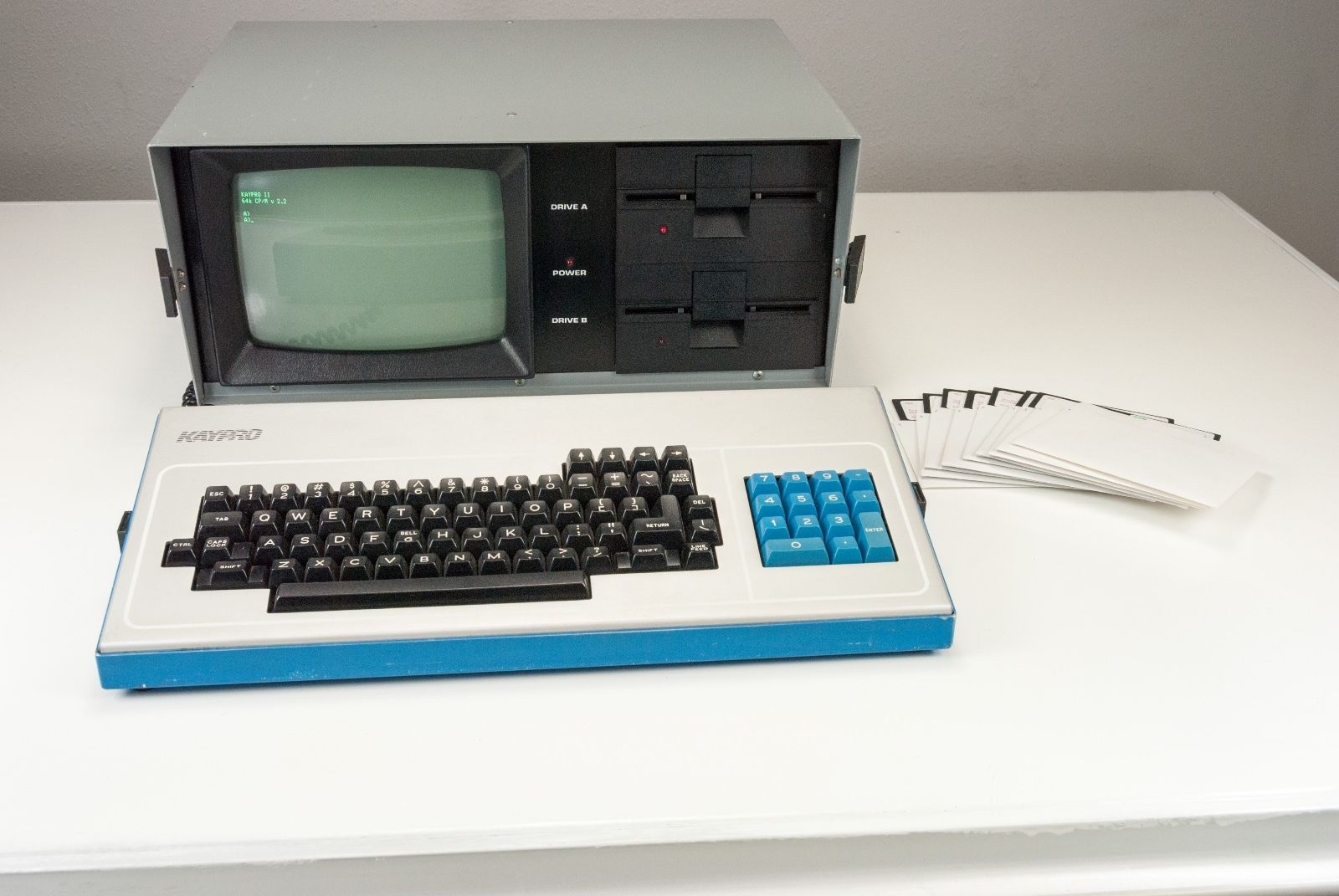 But then I got a Kaypro. Or, more precisely, as of this writing, I've ordered a Kaypro - but it hasn't actually gotten here yet. But I started reading up on it a bit, and I noticed that among the CP/M software that I was getting with it was a copy of dBase II. Now, bearing in mind that I still have no love for xBase systems, I decided that it might be a bit of a nice stroll down memory lane to do a project in dBase, which would also help me in learning the Kaypro and CP/M. So I decided to do a dBase II application to inventory my retro collection and other electronic stuff.
 There was just one wrinkle: I really wanted the ability to print out a report, but I didn't have a printer for the Kaypro. Now, of course, I could buy one, but I really don't want to. I'd already spent enough on the Kaypro itself and some other sundry items (e.g., more software, serial cables, a book), but more importantly I just don't have the room. I have a "man cave" where I can do my retro stuff, but despite it being mine, I really share it with the kids - twin 4-year old girls and a 7-year old boy. This leaves me with only enough room to setup one complete system, with a little leftover space for a "secondary" system if I'm so inclined, i.e., I can have this second system setup and hooked up to the monitor, but it will be cramped, and I can't have much in the way of accessories setup. And right now my main system is an Apple IIgs.
The Apple IIgs

But then I saw an eBay auction for an Apple IIc, which I talked about in two earlier posts: My Latest Retro Acquisition and ADTPro and the Merlin assembler.
I had been happy with the IIc, but then I saw a cheap auction for a IIgs base system - no monitor, keyboard, floppy drives - just the base ROM 01 unit and the original Apple memory expansion card. I bought an ADB keyboard and mouse and hooked it up to my monitor using the composite out and I had a functioning unit with 512k ram. I added a 3.5" drive, a Classic IDE for Apple II card (an IDE interface card for use with hard drives or, as I use it, an IDE-to-Compact-Flash adapter), and a 4 MB memory expansion card, so now I'm running GSOS. More recently, I ditched the composite cable and ran the RGB output into a GBS-8220 to convert it to VGA (using the instructions found here that were easy to follow), which improved my video display tremendously. And I've ordered a CFFA 3000 and an Uthernet II and am anxiously awaiting for both of them to arrive. And only about two weeks ago, I got an ImageWriter II dot matrix printer that works very nicely. And, finally, I ordered the Opus II ByteWorks software set, which includes among other software a IIgs assembler and C compiler.

So I've really gotten hooked on the IIgs and the Apple II line in general. It's a good system with impressive expansion possibilities, and I think it nicely straddles the fence between retro 8-bit systems and more modern systems. It's still an understandable system that you can effectively program in assembler, but you can see in it the beginnings of a lot of the aspects of modern software and hardware that we use today.
So why am I going on about the IIgs when my project ostensibly involves dBase II on the Kaypro? Well, as I talked about earlier, my idea for a project was to do an inventory application in dBase, but since I don't have a printer for my Kaypro and don't want to get one, I decided not to use dBase II or the Kaypro. I would like to do this on my Apple IIgs, where I do have a nice printer, but there is no xBase platform for the IIgs that I could find. Of course, there are other database applications, but I really want to do this on an xBase system. Thus the decision to write my own.
I had been happy with the IIc, but then I saw a cheap auction for a IIgs base system - no monitor, keyboard, floppy drives - just the base ROM 01 unit and the original Apple memory expansion card. I bought an ADB keyboard and mouse and hooked it up to my monitor using the composite out and I had a functioning unit with 512k ram. I added a 3.5" drive, a Classic IDE for Apple II card (an IDE interface card for use with hard drives or, as I use it, an IDE-to-Compact-Flash adapter), and a 4 MB memory expansion card, so now I'm running GSOS. More recently, I ditched the composite cable and ran the RGB output into a GBS-8220 to convert it to VGA (using the instructions found here that were easy to follow), which improved my video display tremendously. And I've ordered a CFFA 3000 and an Uthernet II and am anxiously awaiting for both of them to arrive. And only about two weeks ago, I got an ImageWriter II dot matrix printer that works very nicely. And, finally, I ordered the Opus II ByteWorks software set, which includes among other software a IIgs assembler and C compiler.

So I've really gotten hooked on the IIgs and the Apple II line in general. It's a good system with impressive expansion possibilities, and I think it nicely straddles the fence between retro 8-bit systems and more modern systems. It's still an understandable system that you can effectively program in assembler, but you can see in it the beginnings of a lot of the aspects of modern software and hardware that we use today.
So why am I going on about the IIgs when my project ostensibly involves dBase II on the Kaypro? Well, as I talked about earlier, my idea for a project was to do an inventory application in dBase, but since I don't have a printer for my Kaypro and don't want to get one, I decided not to use dBase II or the Kaypro. I would like to do this on my Apple IIgs, where I do have a nice printer, but there is no xBase platform for the IIgs that I could find. Of course, there are other database applications, but I really want to do this on an xBase system. Thus the decision to write my own.
Wednesday, September 23, 2015
ADTPro and the Merlin assembler
As I mentioned in my last post, I got a nice Apple IIc off of eBay a few days ago. So far I'm quite pleased with it, but it hasn't actually been that much fun or useful. The previous owner (who apparently took very nice care of it) was a user, not a developer. He bought it new and used it to run his business for many years, and then when it was no good for that it became a game machine for his kids and grandkids.
Unfortunately I'm not really much of an arcade gamer, and in any case the bundle didn't include a joystick (he told me that it didn't work any longer). And the only other software that came with the machine were applications: AppleWorks, Quicken, and a set of utility programs. But no development tools or anything that I would be interested in.
So of course I looked into ADTPro. I just didn't have the cables to hook it up however, and I didn't have the parts to build a DIN connector. I could have cut the modem cable, and I do have the parts for a DB-9 connector, so I could have made a cable. But I actually have some hope of eventually using the modem to connect to one of the few remaining dail-up BBS's around, so I didn't want to ruin the cable.
In any case, I ordered the cable from RetroFloppy. Incidentally, although I didn't talk to any of the guys there, I would recommend them if you need anything. When I ordered the cable through PayPal, it charged me a pretty hefty shipping charge of around $10. Well, I didn't think too much about it, but the next day I got an email from one of the guys there who informed me that PayPal had estimated too much for shipping and they gave me a nearly $4 refund. Honestly, the money isn't that big of a deal, but still it's always nice when a company is honest.
So the cable arrived today and of course I hooked it up as soon as I could. And it worked without a problem. I already had a USB-serial converter, so I plugged that into my iMac and ran the ADTPro cable to my Apple IIc. I launched the ADTPro server and followed the instructions and soon enough I had an ADTPro client bootable disk. I then created a ProDOS v1.9 System Utilities disk (the Apple IIc came with a much older copy of ProDOS), and two floppies for Merlin-8 v2.58. It was all simple and worked flawlessly.
So now with Merlin-8 transferred (an Apple II assembler, if you're unaware) I can start doing some development. I've had the Merlin-8 disk images for a while, and I actually also own a copy of the Virtual-][ emulator (a very nice emulator, btw - highly recommended for a nice, retro feel). I've got a copy of Roger Wagner's Assembly Lines, so now I plan to start working through that. Of course, I could have already been doing so using the emulator, but for some reason I really didn't want to until I had a real computer I could use. But with my Apple IIc and Merlin-8 assembler in hand, I hope to start working through the book.
Stay tuned...
Unfortunately I'm not really much of an arcade gamer, and in any case the bundle didn't include a joystick (he told me that it didn't work any longer). And the only other software that came with the machine were applications: AppleWorks, Quicken, and a set of utility programs. But no development tools or anything that I would be interested in.
So of course I looked into ADTPro. I just didn't have the cables to hook it up however, and I didn't have the parts to build a DIN connector. I could have cut the modem cable, and I do have the parts for a DB-9 connector, so I could have made a cable. But I actually have some hope of eventually using the modem to connect to one of the few remaining dail-up BBS's around, so I didn't want to ruin the cable.
In any case, I ordered the cable from RetroFloppy. Incidentally, although I didn't talk to any of the guys there, I would recommend them if you need anything. When I ordered the cable through PayPal, it charged me a pretty hefty shipping charge of around $10. Well, I didn't think too much about it, but the next day I got an email from one of the guys there who informed me that PayPal had estimated too much for shipping and they gave me a nearly $4 refund. Honestly, the money isn't that big of a deal, but still it's always nice when a company is honest.
So the cable arrived today and of course I hooked it up as soon as I could. And it worked without a problem. I already had a USB-serial converter, so I plugged that into my iMac and ran the ADTPro cable to my Apple IIc. I launched the ADTPro server and followed the instructions and soon enough I had an ADTPro client bootable disk. I then created a ProDOS v1.9 System Utilities disk (the Apple IIc came with a much older copy of ProDOS), and two floppies for Merlin-8 v2.58. It was all simple and worked flawlessly.
So now with Merlin-8 transferred (an Apple II assembler, if you're unaware) I can start doing some development. I've had the Merlin-8 disk images for a while, and I actually also own a copy of the Virtual-][ emulator (a very nice emulator, btw - highly recommended for a nice, retro feel). I've got a copy of Roger Wagner's Assembly Lines, so now I plan to start working through that. Of course, I could have already been doing so using the emulator, but for some reason I really didn't want to until I had a real computer I could use. But with my Apple IIc and Merlin-8 assembler in hand, I hope to start working through the book.
Stay tuned...
Saturday, September 19, 2015
My latest retro acquisition
As a quick note to those who may have only read my PDP-8 Challenge blog, this blog is my general blog on whatever topic I want to write about - mostly things related to vintage computers. I haven't updated this in a while because I've really been focused on the PDP-8, but that will probably be changing for a little bit now.

So I'm happy to introduce my latest retro acquisition, a very nice Apple IIc. I got if off eBay for a pretty decent price, and as a bonus the seller lived in my city so I was able to pick it up the day after I won the auction. The machine itself works flawlessly, except for a sticky keyboard (more on that below), or at least I haven't found a problem yet. The bundle came with a bunch of floppies, including 10 blanks, two power supplies, a carrying case, a 1200-baud modem, cables, and manuals. The previous owner wasn't a developer, so it just included application software - AppleWorks 3.0 & 2.0, Quicken, and other miscellaneous programs and utilities. A MultiRam C card had also been added, expanding the memory to a total of 256k. Overall, a good bundle and the guy had clearly kept things in good shape and organized. This was really good for me, because I have no real experience with the Apple II platform, so finding a good collection like this is a good starting point.
So even before I took possession of my new machine, I ordered enhancements. I got a 256k upgrade for the MultiRam C card, an Apple mouse, and an external drive. The drive in particular I was quite interested in, because I have this fear of floppy drives failing. They're just so loud and of course have many ways to fail, so every time I use one I'm just paranoid it will be the last time. It's odd because back in the day I never really thought about it, but now of course the drives are much older - and, to be frank, I'm just not used to something making that much noise. Today, noises like that coming from a computer would pretty much mean we'd be buying a new hard drive at a minimum. That's why I have purchased SD card readers for every retro platform that I've worked with, and the Apple IIc is no exception. Unfortunately I'm going to have to wait until October or maybe November before it gets here. So in the meantime I figured I'd use an external drive so that, if a floppy drive had to fail, the external drive would be a lot easier to replace than an internal drive. Unfortunately I didn't realize until I got the external drive that I can't really boot off of it, so I can't get around using the internal drive. But hopefully the external drive will at least allow me to minimize how much I use the internal drive. And having a second drive is just so much more convenient anyway.
One of the other upgrades I got was an extra 256k for the machine. I wish I could say I honestly needed that much ram, and maybe I will find a good use for it, but certainly at the moment the 256k that the machine already came with would be more than adequate. But it was cheap, so I figured why the hell not. So once I got that, I went ahead and installed it - and resolved my keyboard issue at the same time.
 As I mentioned the keyboard was the only problem with the machine. It worked, but it was very sticky, making any kind of quick typing impossible. I did some googling and found that I wasn't the only one who had such a problem, and thankfully I found some answers. And in the process I also discovered that this was an original version of the Apple IIc, so most of the solutions didn't actually apply to me. When I started to pop off the key caps, I found a black rubber membrane underneath, and under that a burgandy metallic sheet (see the picture). Apparently the early version of the IIc had those as a guard against liquids splashing between the keys and damaging the electronics underneath. But this also apparently caused problems with keys sticking, so it was removed in later models. So I felt reasonably confident in removing it, but that didn't actually solve my problems.
As I hope you can see from the photo to the right, each of the keys has a little metallic clip. I have no idea what this is for, but once I removed them from all the keys, they worked fine. It took me about 30 mins to remove all the clips, but it was well worth the effort since now the keyboard works great.


By the way, just to demonstrate that retro computing isn't just for old guys, here are my twin 4-year old girls playing on the my new Apple. They like to use AppleWorks to type out their names and ABC's. They even now know how to load floppies, though I haven't yet been able to get them to remember to NOT TOUCH THE EXPOSED PART OF THE DISK! I swear I nearly have a heart attack whenever they do that - and trust me, with my blood pressure, that's not a minor concern!
If you're curious, that's Trinity in the top picture and Harmony in bottom one. And that's a Commodore 64 in the background, and the back of a Commodore 1571 disk drive under the monitor.


Subscribe to:
Posts (Atom)